

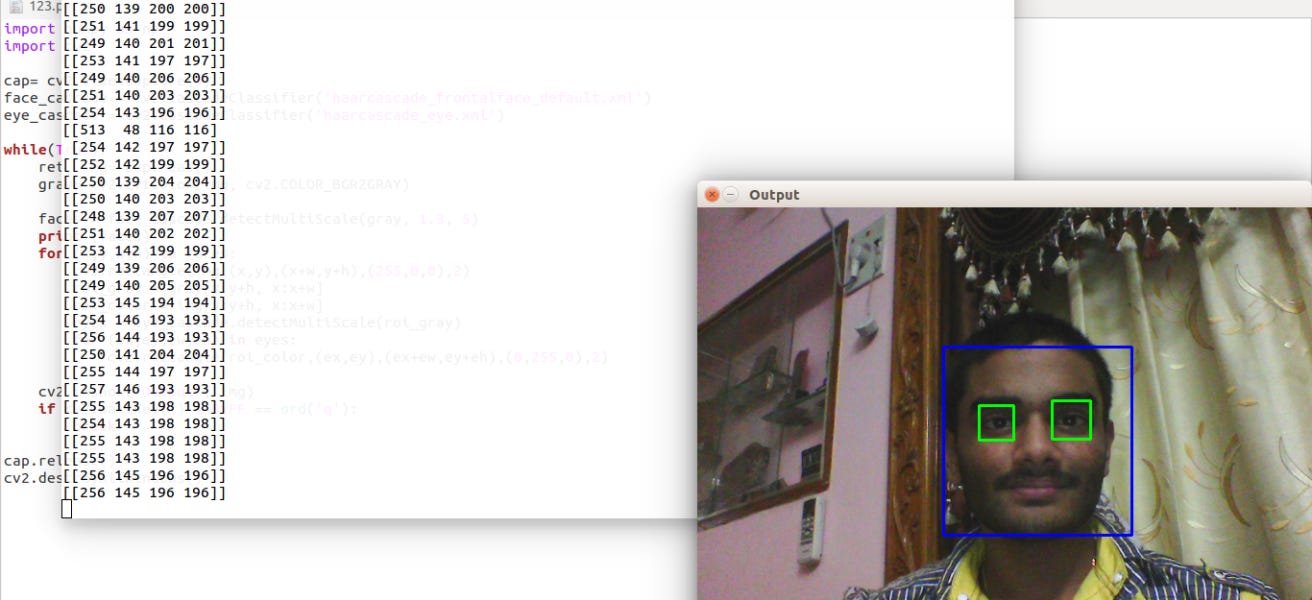
Hello folks, How’s it going!
Today I am going to introduce my face detection algorithm. (not a big one though) Don’t think that this is really a huge task! I am not working from scratch (means I am not actually gathering a huge data set of all pictures (both negative and positive, i.e having faces and not ) and train my algorithm). I have used haar Cascading files.
What the heck are they? Here we go.
Taking samples of a lot of image files of both types (having faces and not having faces) and train the algorithm, make it learn when ever (most probably every time) it makes a mistake and store the whole data into xml files. In this case I am using haar Cascading xml files. As I already said they are huge, wanna know their size? 35k lines of code in each xml file! Yes, you read that right, 35K lines of random numbers.
Coming to the juicy part, the code, here it is. I have commented briefly what each line is contributing.
#import numpy as np
import cv2
#import PIL

#import the xml files. here i am using frontal face and eye.
face_cascade = cv2.CascadeClassifier('haarcascade_frontalface_default.xml')
eye_cascade = cv2.CascadeClassifier('haarcascade_eye.xml')

img= cv2.imread('5.jpg') #reading the image
gray_img= cv2.cvtColor(img, cv2.COLOR_BGR2GRAY) #converting into gratscale(algos work with grayscale images)

faces = face_cascade.detectMultiScale(gray_img, 1.3, 5) #detecting faces. lightning conditions may affect the output
print (faces) #just printing to console. this will print boundary points of detected face(s)

#searching for eyes only in faces. easy and efficient to search only in face rather than whole image
for (p,q,r,s) in faces:
 cv2.rectangle(img,(p,q),(p+r,q+s),(150,125,0),2)        #drawing a rectangle indicating face
 face_gray = gray_img[q:q+s, p:p+r] #cropping   face in gray image
 face_color = img[q:q+s, p:p+r] #cropping face in  color image
 eyes = eye_cascade.detectMultiScale(face_gray)  #searching for eyes in grayscale img
 for (ep,eq,er,es) in eyes:
  cv2.rectangle(face_color,(ep,eq),(ep+er,eq+es), (100,210,150),2) #for each eye drawing rectangle

cv2.imshow("output", img)
cv2.waitKey(0) #showing the img

#this only takes a image and shows the faces in the image. It dont modifies the image.
#if you want to save the resulted image use this...
#cv2.imwrite("output.jpg", img)
Wanna know what it did? I gave this image

and it returned THIS!…….

Currently, I am working on alphabet detection thing to won in a bet with my friend.
Bieeee ^_^
Here somewhere in Milky Way
-Surya